Git Guide
Quick prerequisite: Git basics
If you’re new to Git or want a fast refresher, review one or two of these before continuing:
- Pro Git – Git Basics (official book): Getting Started → Git Basics
- GitHub Docs – Using Git: docs.github.com → Using Git
- Atlassian Git Tutorials: atlassian.com/git/tutorials
- Learn Git Branching (interactive): learngitbranching.js.org
- Git Cheat Sheet (PDF): GitHub Training Git Cheat Sheet
Pull request flow & branching strategy
Our Git workflow is designed so that each team can develop independently while still converging on a stable master branch for final tapeout. Please follow the guidelines below.
1. Branch structure
We maintain these main branches:
-
master
The stable branch containing the most up-to-date, verified code/design. No one should commit directly tomasterunless it’s a final, approved merge. -
Team branches (e.g.
team/rf-analog,team/power,team/dsp,team/integration)
Each major team has its own branch for collaborative development. For example, if you’re on the Power team, you’ll typically work inteam/power. -
Feature branches (e.g.
feature/fix-dc-dc,feature/rf-mixer-tweak)
When you start a new feature or bug fix, you can branch off your team branch (or in some cases directly offmaster), do your changes, then merge back into the team branch via a PR. Once the team branch is stable, it is merged intomaster. You don’t HAVE to use feature branches for everything, but it can be convenient to avoid stepping on your teammates’ toes.
Visual Overview:
master
 ├── team/dsp
 │    └── feature/adc-filter-fix
 ├── team/power
 │    └── feature/fix-dc-dc
 ├── team/rf-analog
 │    └── feature/vco-tuning
 └── team/integration
      └── feature/innovus-floorplan-update
2. Basic workflow
Clone the repository
git clone git@github.com:neu-ucb-tvip/tvip-analog-workspace.git
cd tvip-analog-workspace
Check out your team branch
For example, if you’re on the Power team:
git fetch origin
git checkout -b team/power origin/team/power
If the branch doesn’t exist locally, use -b. Otherwise, just checkout it.
Create a feature branch
You don’t always need to create a feature branch to do work on your team branch. But it can be useful to compartmentalize your work and reduce the risk of conflicts between team members.
If you need to fix something or add a feature, create a new branch based on your team branch:
# Make sure you have the latest changes from remote
git checkout team/power
git pull
git checkout -b feature/fix-dc-dc
Name the branch something descriptive!
Do your work
Make changes to your RTL, layout scripts, etc.
Periodically git add . or git add <specific-file> to stage changes.
Commit frequently with clear messages:
git commit -m "Fix DC-DC cross-corner simulation bug"Push to remote & open a pull request
Push your feature branch to GitHub:
git push origin feature/fix-dc-dcGo to GitHub and open a pull request from feature/fix-dc-dc -> team/power. In the PR description, link relevant Issues (e.g., “Closes #123”). Add your teammates as reviewers if needed.
Code review & merge
Your teammates or TAs review your changes. Once approved, merge your feature branch into the team branch. If your feature is large, consider squash merging to keep commit history clean.
Merging team branches into master
When your team is ready (i.e., you’ve tested thoroughly), open a new PR from team/power -> master.
After final review, it gets merged into master.
This ensures master is always stable and up-to-date with each team’s collective work.
Diagram example of the branching strategy
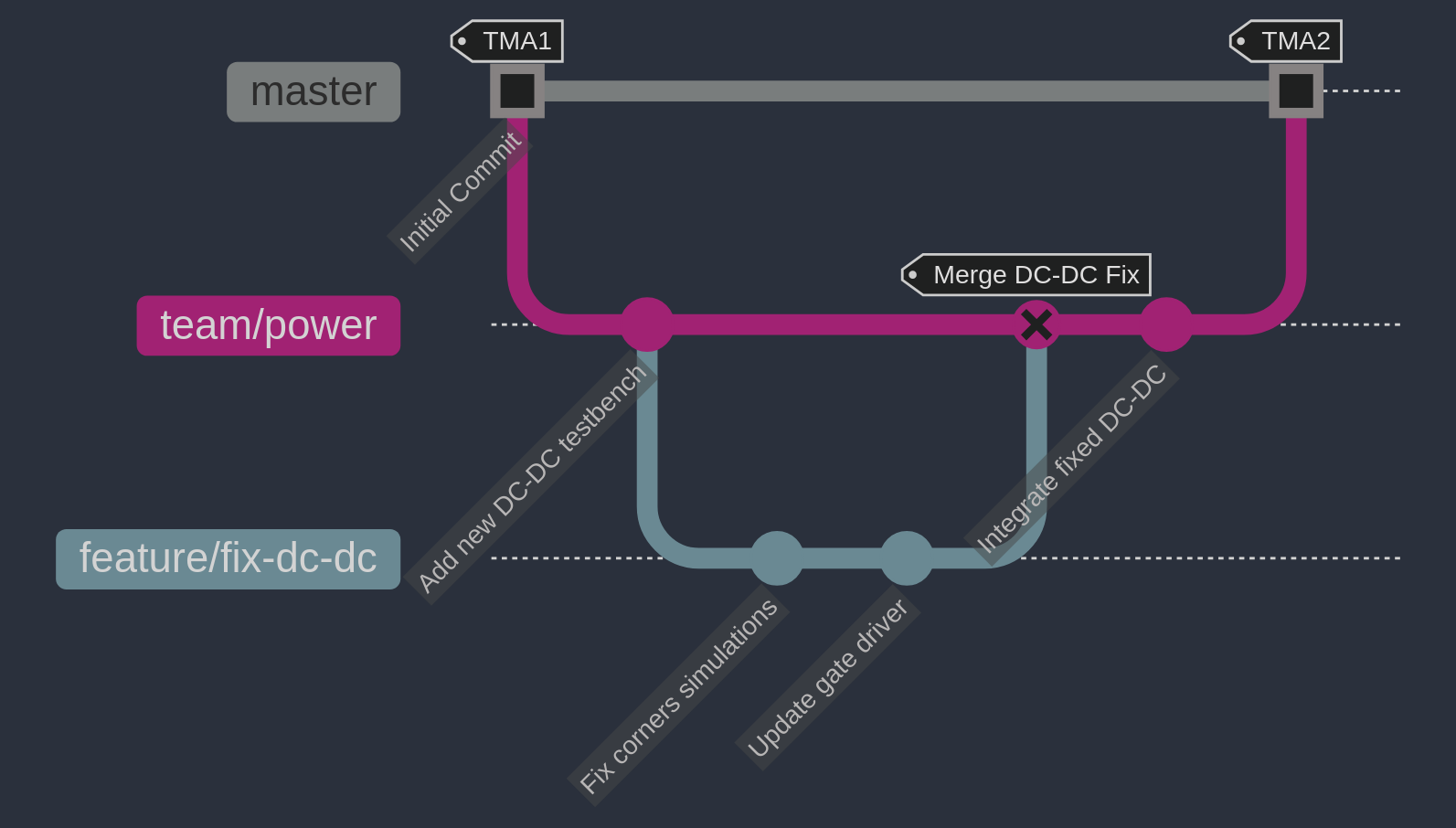
The diagram above illustrates a typical Git workflow:
-
Initial commit (TMA1)
- Project starts on
masterbranch
- Project starts on
-
Team branch creation
- Create
team/powerfrommaster - Add initial dc-dc testbench work
- Create
-
Feature development
- Create
feature/fix-dc-dcbranch - Make two commits:
- Fix corner simulations
- Update gate driver
- Create
-
Feature integration
- Merge
feature/fix-dc-dcintoteam/power - Tag as “merge dc-dc fix”
- Merge
-
masterintegration (TMA2)- Verify
team/powerstability - Merge
team/powerintomaster - All power team updates now available in main codebase
- Verify
3. Useful Git commands
Syncing your branch
Fetch and merge the latest changes
This is the case when you are on team/power and just
want to get updates that, for example, your teammate pushed to
the same team/power branch.
git fetch origin
git merge origin/team/power
or
git pull origin team/powerKeeps your local branch updated with remote changes.
Updating your branch from master
This is the case that you are on team/power and you want to
get the updates that master has.
While on your team/power branch, this will fetch and
merge from the remote’s master branch directly into your
current branch.
It should not require you to switch branches.
# Fetch the latest changes from the remote repository
git fetch origin

# Merge the changes from master into your current branch
git merge origin/master
or
git pull origin masterRebasing (advanced): If you prefer a linear history:
git pull --rebase origin team/powerUse rebase carefully if your team is comfortable with it.
Dealing with merge conflicts
Pull latest changes and attempt the merge/rebase:
git pull origin team/powerIf conflicts occur, open the files with conflicts, fix them, then:
git add <resolved-file>
git commit
git push origin feature/fix-dc-dc
Once conflicts are resolved, the PR can be merged.
Reviewing commits before pushing
Check your commits and differences:
git status
git diff
git log
Amend the last commit (e.g., if you forgot to add a file):
git add forgotten_file.v
git commit --amend
git push --force-with-lease origin feature/fix-dc-dc
Use —force-with-lease with caution; If you ever use —force, you MUST coordinate with teammates if others have pulled your branch.
4. Git best practices
One issue/fix per branch
Keep branches small and focused. Avoid mixing multiple unrelated changes.
Meaningful commit messages
Use clear, concise messages.
Example: “Fix DC-DC converter reference error for SS corner.”
Don’t commit large binary files
Git LFS is used for larger files, check the .gitattributes file for more information on what files are tracked with LFS.
Regularly update team branch from master
Prevent drifting too far behind. Periodically merge or rebase from master to keep your team branch current.
Use pull requests (PRs) for every change
No direct pushes to master.
PRs allow for peer review and continuous integration checks (if we configure them).
Tag your commits if needed
For important tapeout checkpoints, create Git tags (e.g., checkpoint1, checkpoint2, etc.) to mark design snapshots.
Link issues to pull requests
Add “Closes #<issue>” in your commit or PR description so GitHub can auto-close the issue when merged. GitHub can detect the issue number in the commit message.
Communicate conflicts early
If your feature affects another team’s domain, coordinate in GitHub Issues or Slack before finalizing the design.